
How to Write a YouTube Description That Actually Helps Your Video Rank
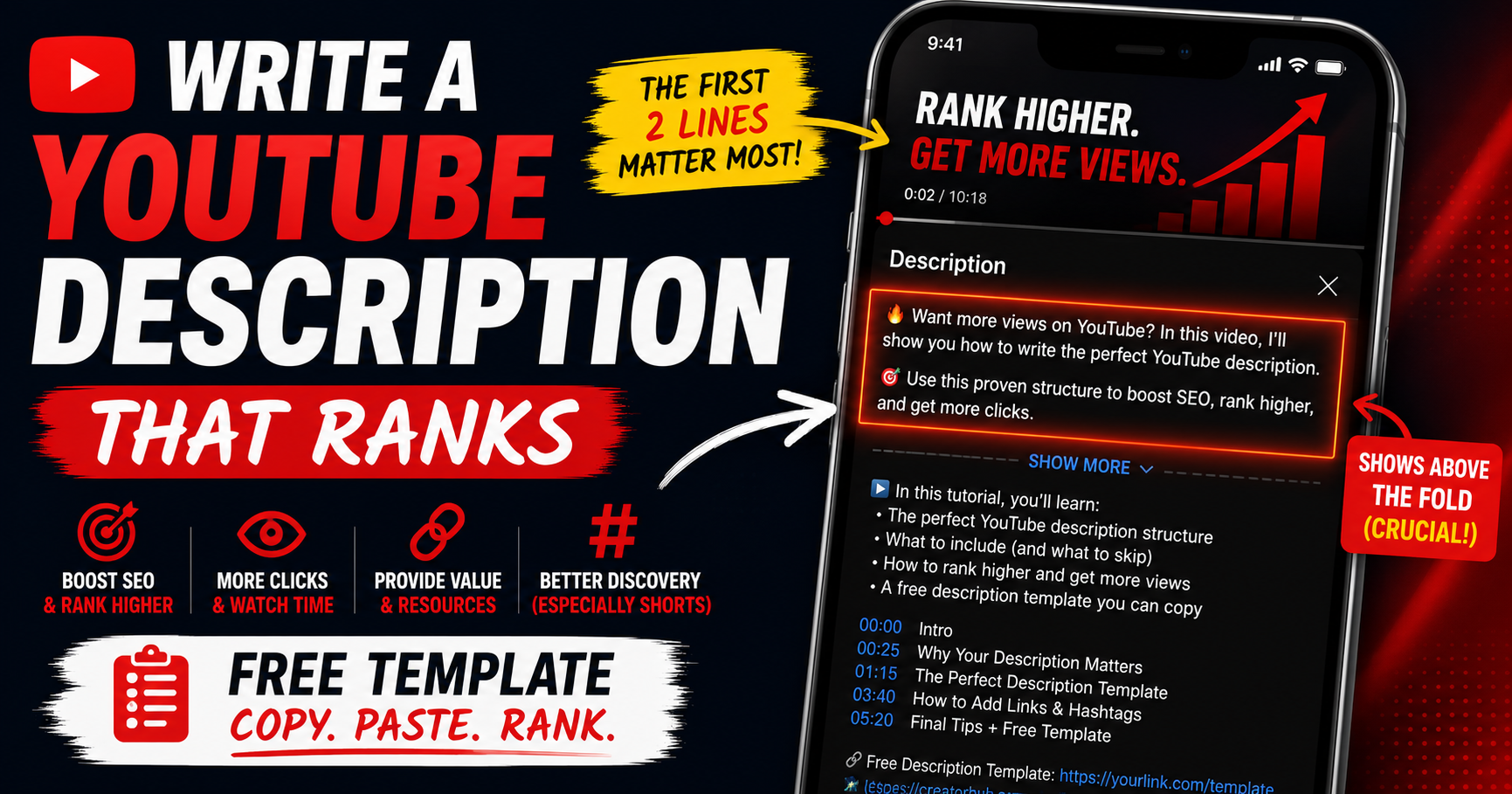
Learning how to write a YouTube description comes down to one idea most creators miss: the first two lines do almost all the work. That's the part viewers see before "Show more," and the part YouTube weighs most for understanding your video. Nail those two lines with a clear hook and your primary keyword, then structure the rest cleanly - that's the whole game.
A good description won't rescue a weak video, and it's not a magic ranking switch. But it gives YouTube useful context, helps the right viewers find you in search, and drives clicks to your links. Here's the structure, exactly what to put where, and a copy-paste template you can reuse for every upload.
Quick Answer
Write a YouTube description in three layers: (1) the first two lines - a hook plus your primary keyword, since that's all viewers see before "Show more"; (2) a short summary with related keywords and any key link or CTA; (3) supporting details like timestamps, links, and 2-3 relevant hashtags. Descriptions allow up to 5,000 characters, but the opening lines matter most. Write naturally - no keyword stuffing.
Why Do YouTube Descriptions Matter?
Descriptions do three jobs. For the algorithm, they give YouTube written context about your topic - one of the signals it uses to match your video to searches. For viewers, the opening lines act like a search snippet that helps them decide whether to click. And for you, the description is where your links and calls-to-action live.
None of that makes descriptions a primary ranking lever - your title, thumbnail, hook, and watch time matter more. But a clear, keyword-relevant description is a genuine supporting signal, and YouTube recommends giving every video a unique one to make it easier to find in search.
The Most Important Rule: Write for "Above the Fold"
Your description has two parts: what viewers see before clicking "Show more," and everything after. Only the first two to three lines - roughly the first 150 characters, though it varies by device - show above that fold on the watch page, and an even shorter slice shows in search results. Most viewers never expand the rest.
So those opening lines are your most valuable real estate. Front-load them: lead with a compelling hook and your primary keyword in plain language, and if you have one key link or CTA, put it here. Don't waste the space on "Hey guys, welcome back to the channel" - that's invisible-by-default text doing no work for search or clicks.
The Anatomy of a Great YouTube Description (Copy-Paste Template)
Structure every description in three layers. Here's the skeleton - copy it, swap in your specifics, and reuse it for every upload:
[LINE 1-2 - ABOVE THE FOLD]
One-sentence hook + your primary keyword in plain language.
(Optional) your single most important link or CTA.
[SUMMARY - 2-4 short lines]
What the video covers and who it's for, using 1-2 related
keywords naturally. A few bullet-style takeaways work well.
[TIMESTAMPS / CHAPTERS]
00:00 Intro
01:30 First section
04:15 Second section
[LINKS & RESOURCES]
Related video, playlist, tools, sources (use full https:// links).
[CHANNEL INFO + HASHTAGS]
One line about your channel + subscribe nudge.
2-3 relevant #hashtags.
That's it. The top is for viewers and search; the middle helps navigation and context; the bottom handles links, boilerplate, and discovery. Save the channel-info and hashtag section as a default description so it auto-fills on every upload.
How to Use Keywords in Your Description (Without Stuffing)
Keywords in your description help YouTube understand and match your video - but only when they read naturally. Put your primary keyword in the first two lines, then weave 1-2 related keywords into the summary where they genuinely fit. Mentioning your main keyword two or three times across the whole description is plenty; beyond that you risk keyword stuffing, which YouTube treats as spam.
The key is knowing which terms to target. Use YouTube keyword research to find the real phrases viewers search for, then write your first two lines and summary around them. Write for a human first; the keywords should disappear into natural sentences.
Timestamps and Chapters
For any video longer than a couple of minutes - tutorials, reviews, podcasts - timestamps are worth adding. List them in the description starting at 00:00, and YouTube automatically turns them into clickable chapters on the progress bar. Chapters improve the viewer experience, help people jump to what they want, and can lift average view duration. Each timestamp line is also a natural place for a relevant keyword describing that section.
Hashtags in the Description
Hashtags belong in the description too. Add 2-3 relevant ones - the first three appear as clickable links above your video's title. Keep them specific to your content; generic tags like #viral do nothing, and going overboard can backfire (YouTube ignores all hashtags past its limit). For the full breakdown, see best hashtags for YouTube Shorts, and for how hashtags differ from backend tags, see YouTube hashtags vs tags.
Links, CTAs, and Channel Info
The description is where your links live - related videos, playlists, your site, sources, sponsor disclosures. Use full https:// links so they're clickable. Put your single most important link near the top (in or just after the fold); keep the rest lower. Add a short line about your channel and a subscribe nudge, and if your video is sponsored or uses affiliate links, disclose it clearly - that's a policy requirement, not optional.
Common Description Mistakes to Avoid
- Wasting the first two lines on "welcome back to the channel" instead of a hook + keyword
- Keyword stuffing - repeating keywords unnaturally, which reads as spam
- Copy-pasting the exact same description onto every video (YouTube recommends unique ones)
- Leaving the description nearly empty - a missed context and links opportunity
- Burying your key link at character 500 where almost no one sees it
- Dumping a wall of hashtags or generic #viral tags
How YouSEO Helps
Writing a strong, structured description for every upload takes time - the right hook, the right keywords, clean timestamps, the proper layout. YouSEO speeds it up. The youtube description generator drafts a structured, keyword-aware description for your video in seconds - front-loaded first lines, a clean summary, and space for your timestamps and links - so you start from a solid draft instead of a blank box. Pair it with keyword research so the terms it builds around are ones people actually search. Its value is speed and structure; you still add your specific links, timestamps, and voice. Before publishing, check your whole video's optimization - see check your YouTube video's SEO score.
A Real Example: Weak vs Strong Opening Lines
Weak: "Hey everyone, welcome back to my channel! Don't forget to like and subscribe. In today's video..." - by the time anything useful appears, the viewer has hit the fold and YouTube has read a greeting with no topical signal.
Strong: "Learn how to edit videos faster in DaVinci Resolve - 7 beginner shortcuts that cut your editing time in half. Free preset pack below." - the primary keyword is right there, the value is obvious, and the CTA is visible above the fold. Same video, but the strong opening earns the click and gives YouTube a clear topic. That's the entire difference, and it lives in the first two lines.
Frequently Asked Questions
How long should a YouTube description be?
As long as it's useful - there's a 5,000-character maximum, but you don't need to fill it. A focused description with a strong first two lines, a short summary, timestamps, and links is plenty. Quality beats length; a clean 300-800 characters of useful content outperforms a keyword-stuffed wall of text.
What should the first line of a YouTube description say?
A one-sentence hook that includes your primary keyword in plain language. It's what viewers see above "Show more" and what YouTube weighs most, so make it clear and compelling - not a generic greeting. If you have one key link or CTA, put it right after.
Do YouTube descriptions help with SEO?
Yes, as a supporting signal. Descriptions give YouTube written context about your topic and help match your video to searches, and unique, keyword-relevant descriptions make videos easier to find. They're not a primary ranking lever - title, thumbnail, and watch time matter more - but they genuinely help.
How many keywords should I put in a description?
Use your primary keyword in the first two lines and mention it two or three times total across the description, plus 1-2 related keywords woven in naturally. More than that risks keyword stuffing, which YouTube treats as spam. Write for humans first.
Should every video have a different description?
Yes for the main content. YouTube recommends a unique description per video so it's easier to find in search and stands out from similar videos. You can keep a consistent lower section (channel info, links, hashtags) as a default, but the opening lines and summary should be specific to each video.
The Bottom Line on YouTube Descriptions
A great YouTube description isn't about filling 5,000 characters - it's about nailing the first two lines with a hook and your primary keyword, then structuring the rest cleanly. Write for the viewer above the fold, give YouTube honest context below it, and keep every keyword natural. It won't carry a weak video, but it's a real supporting signal worth getting right.
Start from a solid draft instead of a blank box: find the right terms with YouSEO's keyword research, then generate a structured, keyword-aware description in seconds with the youtube description generator. Add your links, timestamps, and voice - then put your energy into the title, thumbnail, and hook. Try YouSEO free today.