
YouTube Hashtags vs Tags: The Difference (And Which One Gets You Views)
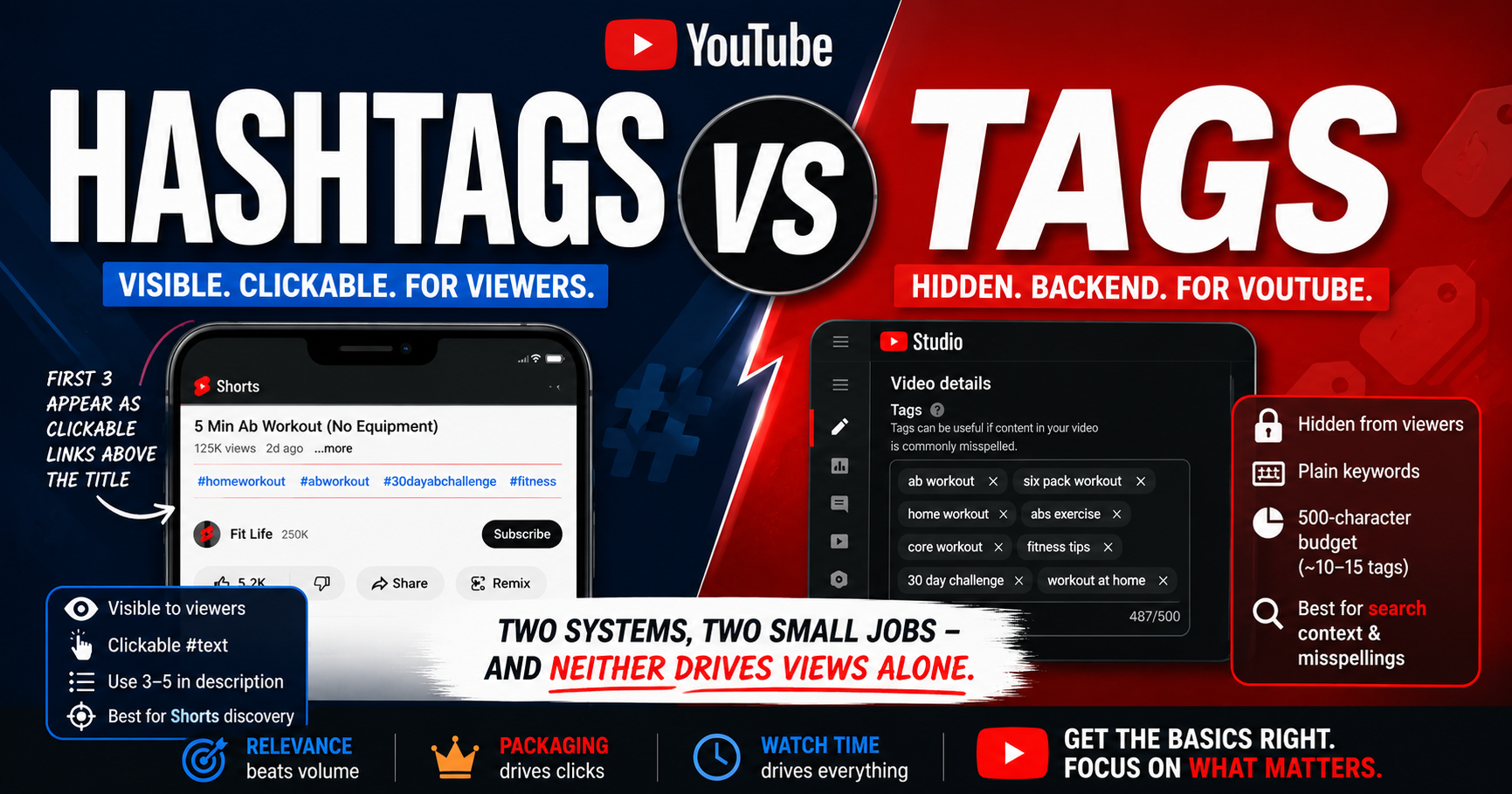
The YouTube hashtags vs tags question trips up almost every creator, because the two sound similar but are completely separate systems. The short version: tags are hidden backend keywords only YouTube sees; hashtags are visible, clickable #text your viewers can tap. And the honest answer to "which one gets you views"? Neither, really - not on its own.
Both are minor signals. Your title, thumbnail, first-3-seconds hook, and watch time do the real work. But used correctly, tags and hashtags each do a small, useful job - so here's the clear difference, how many of each to use, and when to prioritize which.
Quick Answer
Tags are hidden backend keywords (a 500-character budget) that help YouTube understand your topic and mainly matter for search and misspellings. Hashtags are visible, clickable #text - use 3-5, in the description - that aid categorization and Shorts discovery. Neither drives views much on its own; your title, thumbnail, and hook do. Use both, correctly.
What's the Difference Between Tags and Hashtags on YouTube?
Tags are hidden metadata you enter in YouTube Studio - viewers never see them. Hashtags are visible #text you place in your title or description, and viewers can click them to find related content. They're independent systems with different rules, different placements, and different jobs. Here's the full side-by-side:
| Tags | Hashtags | |
|---|---|---|
| Visibility | Hidden - viewers never see them | Visible, clickable |
| Where they live | YouTube Studio (backend) | Title or description |
| Format | Plain keywords, comma-separated | #text with a hash symbol |
| Limit | 500-character total budget (no count cap) | Over 60 = all ignored |
| Recommended | ~10-15 relevant tags | 3-5 relevant hashtags |
| Primary job | Topic context; misspellings | Categorization; clickable discovery |
| Impact on views | Minimal | Minimal |
| Best for | Long-form search context | Shorts discovery |
The table makes the pattern clear: same goal (help YouTube understand and surface your video), two entirely different mechanisms - and both are minor next to your packaging.
What Are YouTube Tags?
Tags are hidden, backend keywords entered in YouTube Studio (video Details → Show more). They share a single 500-character budget, with no official recommended count - roughly 10-15 focused, relevant tags is a common sweet spot, and the first tag should be your exact target keyword. YouTube's Help Center says tags "play a minimal role" in discovery and are mainly useful for common misspellings. For the deep dive, see Best YouTube Tags to Get Views and Do YouTube tags still matter. To build a relevant set fast, use the youtube tag generator.
What Are YouTube Hashtags?
Hashtags are visible, clickable #text placed in your title or description - the description is the recommended spot. The first 3 hashtags in your description appear as clickable links above your video's title, so choose those carefully. Use 3-5 relevant hashtags in a broad → topic → niche funnel. Note that #Shorts is optional in 2026, not required - YouTube classifies Shorts automatically. For the full breakdown, see Best Hashtags for YouTube Shorts, and build a relevant set with the youtube hashtag generator.
How Many Hashtags (and Tags) Should You Use on YouTube?
This is the most-searched sub-question, so here's the direct answer for both:
- Hashtags: use 3-5 relevant ones, placed in the description. The documented ceiling is 60 - go over it and YouTube ignores every hashtag on the video (some older guides cite 15; either way, 3-5 keeps you safe). Only the first 3 show above your title.
- Tags: there's no official count - just a 500-character total budget for all tags combined. Roughly 10-15 focused, relevant tags is a common sweet spot. Make the first tag your target keyword, and don't stuff filler to hit the character limit.
For both, relevance beats volume. Stuffing either field dilutes your signal and risks a spam flag.
So Which One Actually Gets You More Views?
The honest verdict: neither is a major view driver. Both are minor signals that help YouTube categorize and surface your content - nothing more. That said, there's a slight lean. Hashtags tend to help a bit more with Shorts discovery, since they aid the Shorts feed and clickable hashtag-page browsing. Tags tend to help a bit more with long-form search context and misspellings.
But "a bit more" is still minor. In every case, your title, thumbnail, first-3-seconds hook, and watch time matter far more than any tag or hashtag. Set both correctly in under a minute, then put your real energy where views actually come from.
When to Prioritize Which
- Making a Short? Spend your small metadata effort on 3-5 relevant hashtags in the description. That's where hashtags earn their (minor) keep.
- Making long-form for search? A focused set of relevant tags plus a keyword-rich title and description both help slightly. Tags add a little search context here.
Either way, packaging comes first. Metadata is the finishing touch, not the foundation.
Do Tags and Hashtags Work Together?
Yes - and there's a third piece: keywords. Keywords are the underlying search terms viewers actually type, and they inform both your tags and your hashtags (and your title and description). The workflow is simple: use YouTube keyword research to find the real terms, then express them as relevant tags in the backend and relevant hashtags in the description. One system doesn't replace another - they're complementary layers of the same goal: helping YouTube understand and surface your video.
Common Mix-Ups and Mistakes
- Confusing the two - pasting #hashtags into the tags field, or dumping plain tag keywords into the description as "hashtags"
- Stuffing either field to fill the limit with filler instead of relevant terms
- Using #viral, #fyp, or generic single-word tags that signal almost nothing
- Ignoring relevance - irrelevant tags or hashtags can trigger spam detection
- Going over the hashtag ceiling, which makes YouTube ignore all of them
How YouSEO Helps
Once you know the difference, getting both right is quick. Start with keyword research to surface the search terms behind good metadata. Then build a relevant, budget-appropriate tag set with the youtube tag generator, and a relevant, funnel-structured hashtag set for your Shorts with the youtube hashtag generator. Both are about speed and relevance, not magic - they get the minor signals right in seconds so you can focus on the title, thumbnail, and hook. Before publishing, it's worth checking your whole video's optimization - see check your YouTube video's SEO score.
A Real Example: Same Video, Done Right vs Wrong
Two creators upload the same tutorial. Creator A does it right: about 12 relevant tags in the backend (target keyword first), 4 relevant hashtags in the description, and a sharp title and thumbnail. YouTube gets clean signals, the packaging earns clicks, and the video gets found.
Creator B does it wrong: 30 stuffed tags including generic single-word junk, 20 hashtags led by #viral and #fyp, and a rushed thumbnail. YouTube reads noise, the excess hashtags risk being ignored entirely, and the weak packaging means few clicks anyway. Same video - the difference was relevance and priorities, not the amount of metadata.
Frequently Asked Questions
What's the difference between tags and hashtags on YouTube?
Tags are hidden backend keywords in YouTube Studio that viewers never see; they share a 500-character budget and mainly help with topic context and misspellings. Hashtags are visible, clickable #text in your title or description that aid categorization and Shorts discovery. They're separate systems - use both.
How many hashtags should I use on YouTube?
Use 3-5 relevant hashtags in the description. Going over 60 total makes YouTube ignore every hashtag on the video, and only the first 3 appear above your title. Three to five gives strong categorization without looking spammy.
How many tags should I use?
There's no official count - just a 500-character total budget. Roughly 10-15 focused, relevant tags is a common sweet spot. Make the first tag your target keyword and keep every tag genuinely relevant.
Which matters more for views, tags or hashtags?
Neither matters much on its own. Hashtags help a bit more with Shorts discovery; tags help a bit more with long-form search. Both are minor next to your title, thumbnail, hook, and watch time - which do the real work.
Do hashtags replace tags?
No. They're independent systems doing different jobs, and one doesn't replace the other. Use both, informed by the same underlying keywords - relevant tags in the backend and 3-5 relevant hashtags in the description.
The Bottom Line
Tags and hashtags are two separate systems doing two small jobs. Tags are hidden and help with topic context; hashtags are visible and help with discovery, especially on Shorts. Neither will make a weak video take off - but used correctly, both give YouTube a cleaner signal. Learn the difference, set each right, and move on to what matters.
Now that you know the difference: find the search terms with YouSEO's keyword research, build a relevant tag set with the youtube tag generator and a relevant Shorts hashtag set with the youtube hashtag generator, then put your energy into the hook, title, and thumbnail. Try YouSEO free today.