
YouTube Now Lets You Upload Custom Thumbnails for Shorts (2026): What Changed and How to Win With It
Published July 28, 2026 · Based on YouTube's official announcement of July 24, 2026
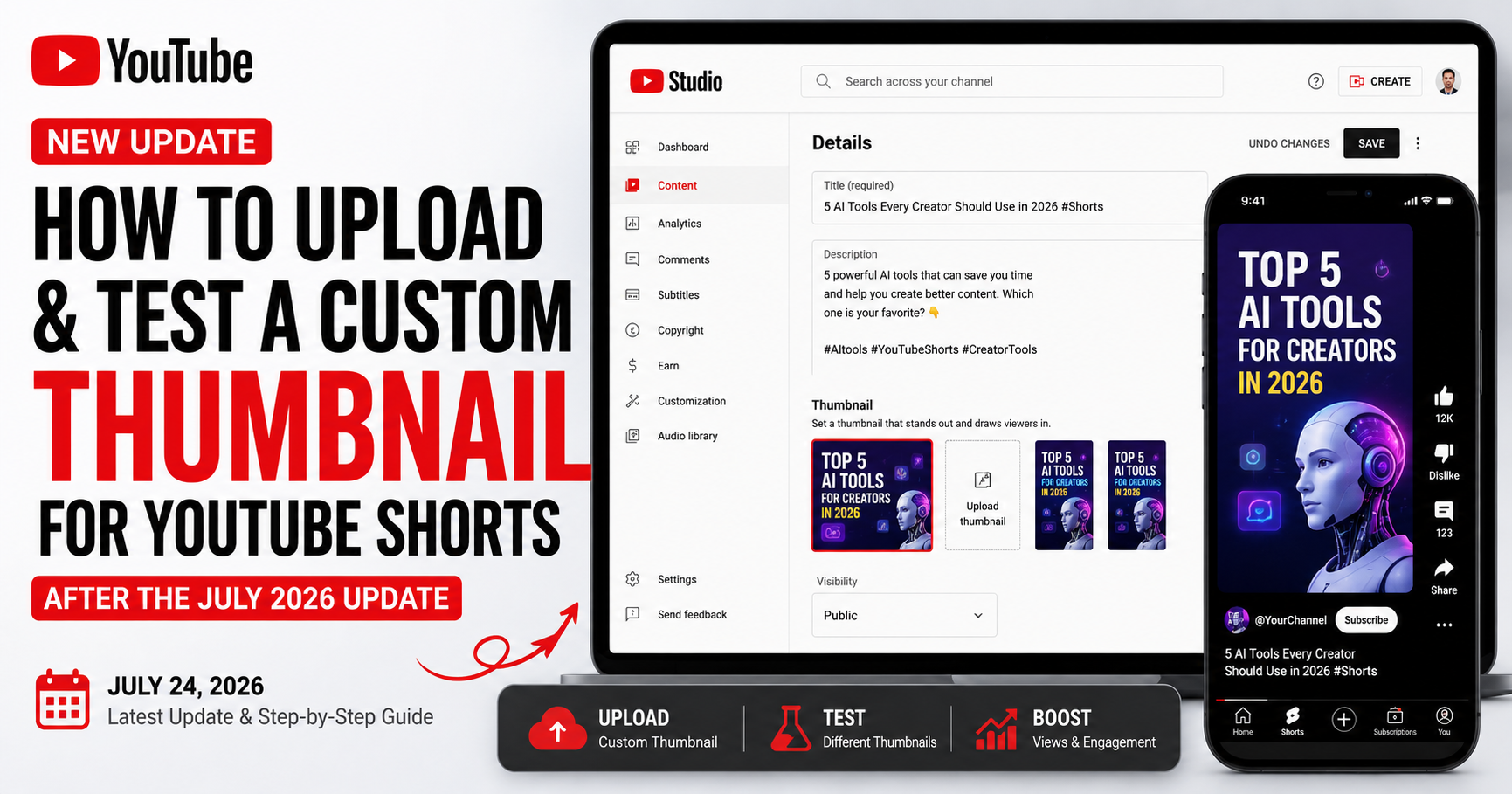
On July 24, 2026, YouTube announced one of the most-requested Shorts features ever: custom thumbnails for Shorts. For years, Shorts creators could only pick a still frame from the video itself - now, eligible creators can upload their own custom thumbnail, the same way long-form videos have worked all along. It's a genuine shift in how Shorts get discovered.
Here's why it matters right now: most Shorts creators haven't even noticed this rollout yet. The ones who start using custom thumbnails in the next few weeks - and, crucially, test them before uploading instead of guessing - will stand out in every place a Short's thumbnail actually decides the click. This post covers exactly what changed, who gets it, and the full workflow to win with it.
What Changed: the Short Version
YouTube's July 24, 2026 thumbnail update - three changes:
• Custom Shorts thumbnails (YPP): YouTube Partner Program creators can now upload custom thumbnails for Shorts, with a gradual rollout to more creators over time.
• Three suggested frames on desktop: In YouTube Studio on desktop, you can pick from three suggested thumbnail frames for Shorts - just like long-form. On the mobile app, you can still choose any frame from the video.
• AI thumbnails in Ask Studio (long-form only): You can now generate thumbnails by chatting with Ask Studio - but this one is for long-form videos, not Shorts.
Can You Upload a Custom Thumbnail for YouTube Shorts?
Yes - if you're in the YouTube Partner Program. This is the headline change. According to YouTube's official announcement, YPP creators can now upload a custom thumbnail for a Short, giving you full control over the image instead of settling for a frame pulled from the video. YouTube called it a top-requested feature and said it will expand to more creators over time.
Alongside that, two smaller updates shipped. On desktop in YouTube Studio, you can now choose from three suggested thumbnail frames for Shorts - the same option long-form videos already had - while the mobile app still lets you pick any frame from the video. And separately, YouTube is bringing AI thumbnail generation into Ask Studio, where you ask for a thumbnail and refine the colors and layout by chatting. Important: that AI generation feature is for long-form videos, not Shorts, so don't confuse the two.
Who Can Upload Custom Shorts Thumbnails?
Right now, custom Shorts thumbnails are available to YouTube Partner Program creators first, and YouTube has said it will expand access to more creators over time. So if you're not in YPP yet, you may not see the upload option today - that's expected. It's a gradual rollout, not a universal switch that flipped for everyone at once.
If you're not in YPP yet, here's what to do in the meantime:
- Use the three-frame picker on desktop (or pick a strong frame on mobile) to get the best available thumbnail now.
- Start designing custom Shorts thumbnails today so you're ready the moment upload access reaches you.
- Keep growing toward YPP - the custom thumbnail upload is one more reason the program is worth reaching.
Do Shorts Thumbnails Matter for Views?
Yes - but let's be precise about where and why, because this is where most advice gets it wrong. In the vertical swipe feed, Shorts autoplay, so no thumbnail is shown there. If that were the only place Shorts appeared, thumbnails wouldn't matter much. But it isn't.
Shorts increasingly show up in places where a thumbnail absolutely decides the click:
- Search results - Shorts appear alongside long-form videos, each represented by its thumbnail.
- Related and suggested videos - where your thumbnail competes with every other option on screen.
- Your channel's Shorts tab - a grid of thumbnails viewers scan to decide what to watch.
- Homepage and browse shelves - where a strong thumbnail earns the tap over the next Short.
Here's the part that matters for you: Shorts are increasingly a search surface, and search is exactly where a great thumbnail earns clicks. That's why guessing at a thumbnail is a mistake - and why testing it before you post is such an edge.
How to Make a Shorts Thumbnail That Wins the Click
Shorts thumbnails are vertical (9:16), which is different from the wide 16:9 thumbnails you're used to for long-form. They're also often viewed at small sizes, so clarity beats detail every time. The principles that work:
- One clear subject. A single focal point - a face, a product, a reaction - not a busy collage.
- Large, readable text. Three to four words maximum, big enough to read on a phone screen at a glance.
- High contrast. Bold colors and clear separation between subject and background so it pops in a crowded feed.
- Expressive faces. Genuine emotion draws the eye - curiosity, surprise, delight.
- Legible at tiny sizes. Shrink your design to thumbnail size and check it still reads. If you can't tell what it is, neither can viewers.
The most common mistake creators make is treating a Shorts thumbnail like a long-form one. A wide 16:9 layout with text along the bottom gets awkwardly cropped in vertical placements, and detail that looks fine on a desktop preview vanishes in a phone-sized grid. Design vertical from the start, keep the important elements in the center where they won't get cut, and always sanity-check at small size. What reads instantly at a glance wins; what needs a second look loses the click.
You don't need to open a full design app for any of this. Generate several vertical options fast with YouSEO's thumbnail generator for Shorts, which builds Shorts-ready thumbnails so you can go straight from idea to a few real options in seconds - then pick the strongest to test.
Don't Guess - Test Your Thumbnail Before You Upload It
This is the step almost everyone skips, and it's the whole difference between hoping and knowing. Instead of uploading a thumbnail and wondering whether it works, you can check it first. YouSEO's Thumbnail Click Score predicts how appealing your thumbnail is and puts it in plain language - something like "About 2 in 100 people will click it" - so you don't need to interpret jargon or read charts. You just see how your design is likely to land.
The workflow is simple: generate two or three thumbnail options, score each one, and upload the winner. Testing three options and posting the highest-scoring one takes a couple of minutes and replaces guesswork with a real signal - before the Short ever goes live. That's the honest edge here: not a promise of views, but knowing which of your options is strongest instead of flipping a coin.
Know before you post: Generate a few Shorts thumbnails with the thumbnail generator for Shorts, then check each with the Thumbnail Click Score - free, before you upload. It won't guarantee a viral Short, but it tells you which design is your strongest bet.
Step-by-Step: the Full 2026 Shorts Thumbnail Workflow
Here's the complete loop, combining YouTube's new upload flow with the YouSEO generate-and-score process:
1. Generate options. Use the thumbnail generator for Shorts to create two or three vertical (9:16) thumbnail options for your Short.
2. Score each one. Run every option through the Thumbnail Click Score and read the plain-language result for each.
3. Pick the winner. Choose the highest-scoring thumbnail - the one most likely to earn the click in search and related videos.
4. Upload it in YouTube Studio. On desktop, open your Short in Studio and upload your custom thumbnail (YPP creators). Not in YPP yet? Choose the best of the three suggested frames instead.
5. Publish and watch the right metric. After posting, check how the Short performs in search and suggested placements over time, where the thumbnail does its work.
That's it - idea to tested, uploaded thumbnail in minutes. Do this consistently and you'll be ahead of the vast majority of Shorts creators still using auto-selected frames.
What This Means for Shorts SEO Going Forward
Until now, Shorts optimization was mostly about the title, description, and hashtags. Custom thumbnails add a new lever - one that directly affects the click wherever your Short appears outside the swipe feed. In other words, the thumbnail now joins your title, description, and hashtags as part of Shorts SEO, not a separate concern.
There's a deeper reason this matters. As Shorts keep expanding into search and suggested placements, they behave more and more like long-form videos - discoverable through the same signals, judged on the same click decision. A thumbnail that earns the click in those surfaces doesn't just win one view; it feeds the watch time and engagement that push a Short further. That's why a tested thumbnail is worth the extra two minutes: it compounds.
If you're serious about Shorts discovery, treat all of these together: a searchable title, a keyword-relevant description, relevant hashtags, and now a tested thumbnail. Check your Short's overall optimization with the YouTube Shorts SEO checker, and for the hashtag side, see best hashtags for YouTube Shorts. The creators who combine all four will have a real, compounding edge as this rollout expands.
Frequently Asked Questions
Can you upload a custom thumbnail for YouTube Shorts?
Yes, if you're in the YouTube Partner Program. As of July 24, 2026, YPP creators can upload custom thumbnails for Shorts, and YouTube says it will expand access to more creators over time. If you're not in YPP yet, you may not see the option immediately.
Who can upload custom Shorts thumbnails?
YouTube Partner Program creators first. YouTube announced a gradual rollout, so custom Shorts thumbnail uploads are reaching YPP creators initially and will expand to more creators over time. Non-YPP creators can still use the suggested frame options in the meantime.
What size should a YouTube Shorts thumbnail be?
Design for the vertical 9:16 format that Shorts use, and make sure your subject and any text stay clear and readable at small sizes. Because Shorts thumbnails appear at a glance in search, related videos, and channel grids, clarity and high contrast matter more than fine detail.
Do Shorts thumbnails matter for views?
Yes, where Shorts appear outside the vertical swipe feed - in search results, related videos, your channel's Shorts tab, and homepage shelves - the thumbnail helps decide the click. In the swipe feed itself, Shorts autoplay, so no thumbnail is shown there. Since Shorts increasingly surface in search, thumbnails matter more than ever.
How do I know if my Shorts thumbnail is good?
Test it before uploading. YouSEO's Thumbnail Click Score predicts how appealing your thumbnail is in plain language, so you can compare options and upload the strongest one instead of guessing. Generate a few, score each, and post the winner.
The Bottom Line
Custom thumbnails for Shorts are a real, meaningful change - and right now, most creators haven't caught on. YouTube Partner Program creators can upload custom Shorts thumbnails today, with access expanding over time, and thumbnails matter most exactly where Shorts are growing fastest: in search and suggested video. The creators who pair a strong custom thumbnail with quick testing in these early weeks will out-click everyone still using an auto-selected frame.
Don't guess your way through it. Generate a few options with the thumbnail generator for Shorts, check each with the Thumbnail Click Score, and upload the strongest - free, before you post. Download the YouSEO app or use the Web App to know before you post, not after.