
How to Choose a YouTube SEO Tool in 2026 (A Framework for Channels Under 100K Subs)
If you're trying to figure out how to choose a YouTube SEO tool, start by throwing out the question everyone asks. "What's the best YouTube tool?" has no answer - because the best tool for a 500K-subscriber channel with a team and a 2,000-video back-catalog is genuinely different from the best tool for a solo creator posting Shorts from a phone. The right question is: best for a channel like yours.
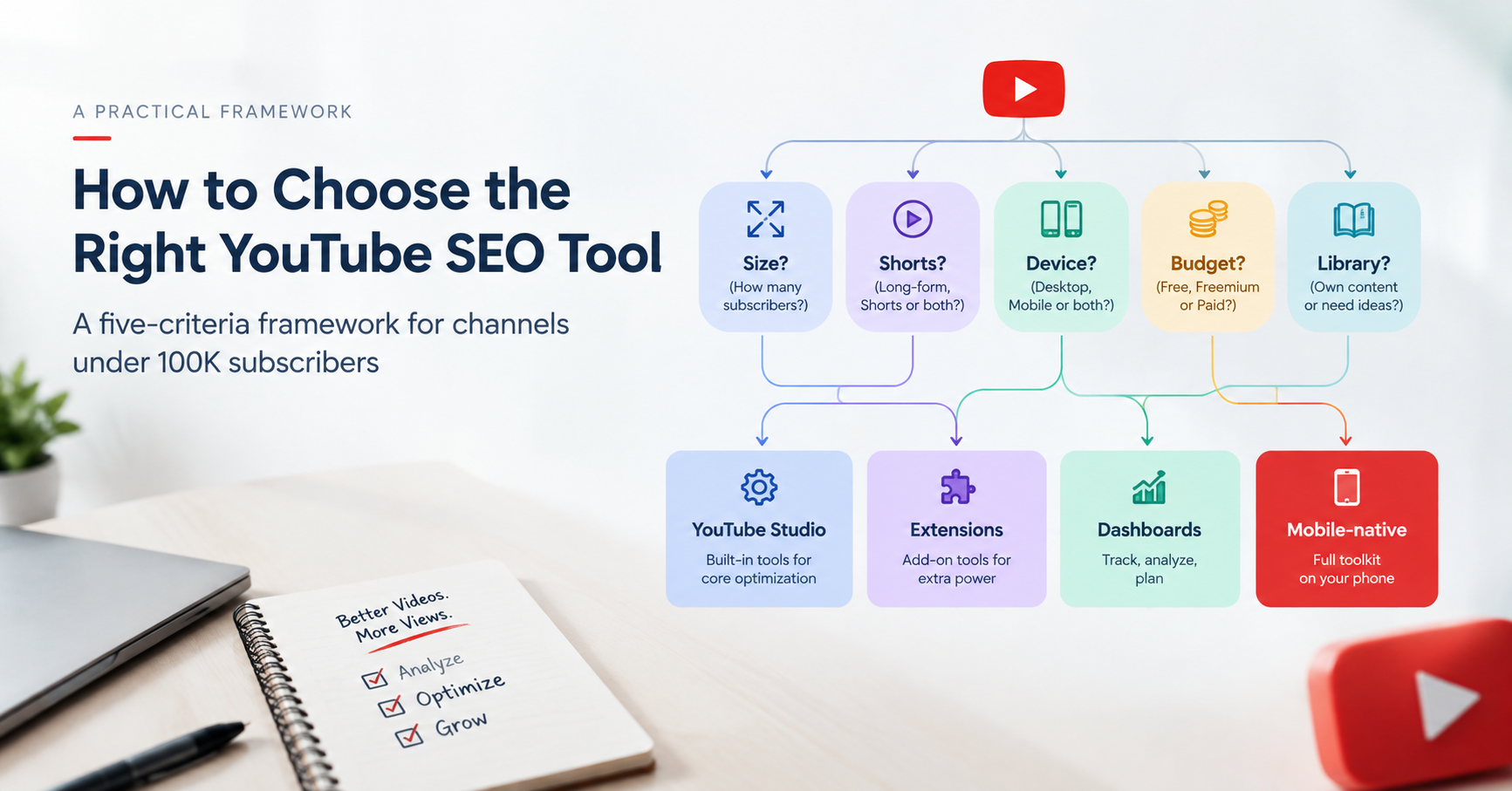
This is a framework, not a listicle. Five questions - your channel size, your Shorts mix, your device, your budget, and your library - each mapped honestly to a tool category. By the end you'll know which category fits you, including the possibility that the honest answer is no paid tool at all yet. One disclosure before we start applying it to products: this blog is published by YouSEO, and we'll tell you plainly where our own app does and doesn't fit.
Quick Answer
There's no single best YouTube SEO tool - the right one depends on five things: channel size, Shorts vs long-form mix, device, budget, and library size. Most creators who use a phone and make Shorts fit a mobile-native app; desktop-first teams running bulk operations across big back-catalogs fit dashboard or extension tools; and creators not yet publishing consistently may need only YouTube Studio.
Do You Actually Need a YouTube SEO Tool Yet?
Honest answer: maybe not. If you're not yet publishing consistently - say, at least one video or a few Shorts every week - no tool will move the needle, because tools optimize output you're not producing. In that stage, YouTube Studio alone is enough: it's free, it shows your impressions, click-through rate, and retention, and it teaches you what the platform measures. Build the publishing habit first; add tooling when you have output worth optimizing.
A tool starts earning its place when you're publishing consistently and hitting the same friction repeatedly: not knowing what topic to make, guessing at titles and thumbnails, or watching Shorts stall with no idea why. That's the point where the five criteria below tell you which category of tool fits.
The Five Criteria That Decide Which Tool Fits You
1. Channel Size and Stage
The real question here isn't your subscriber count - it's how you work. If you publish and optimize one video at a time, which is how the vast majority of creators operate at every size, your growth levers are topic selection, packaging (titles and thumbnails), and Shorts discovery, and you need tools that sharpen each upload. If you're running agency-scale operations - managing many channels, or bulk-editing a back-catalog of hundreds of videos as a team - the calculus flips: bulk management, competitor tracking, and portfolio dashboards genuinely earn their cost. Mapping: per-upload workflow → lightweight per-upload tools, at any channel size; agency-scale bulk operations → the desktop dashboard category is a legitimate fit.
2. Long-Form vs Shorts Mix
Shorts discovery runs on different rules than long-form search - the feed, the hook, and topic momentum matter more than classic search metadata. Here's the catch: many established tools were built in the pre-Shorts era and treat Shorts as an afterthought. If Shorts are a serious part of your mix, Shorts-specific SEO analysis is a category differentiator worth screening for explicitly. If your Shorts are already stalling, see why your Shorts get no views for what actually moves them. Mapping: Shorts-heavy → prioritize tools with dedicated Shorts analysis, which today means mostly newer, mobile-era tools.
3. Your Primary Device
This one is a technical fact, not a preference. Browser extensions do not run in standard mobile browsers - Chrome for Android and Safari on iOS don't support them - so the entire extension-based category is effectively desktop-only. If you create primarily from a phone, extensions aren't a worse option; they're not an option. Desktop-first creators can choose from any category. Phone-first creators need a mobile-native app - we've covered that landscape in depth in best YouTube growth apps for mobile creators. Mapping: desktop-first → any category; phone-first → mobile-native apps.
4. Budget
Be honest about stage economics. A pre-revenue beginner should not be paying desktop-suite subscription prices - that money is better spent on a microphone. The realistic ladder: free (YouTube Studio, plus the free tiers most tools offer across every category, including YouSEO's), then low-cost mobile app subscriptions, then mid-to-high desktop suite pricing when a channel's revenue justifies it. Mapping: free/low budget → free tiers and low-cost mobile apps; established revenue → whatever category your workflow needs, priced accordingly.
5. Library Size and Workflow
If you have hundreds of existing videos needing bulk metadata edits, tag overhauls, or A/B testing infrastructure across a back-catalog, the desktop dashboard and extension categories are genuinely stronger - that's what they're built for, and a per-video mobile app would be the wrong shape for the job. If you're growing a library one upload at a time and optimizing each video as you publish it, lightweight per-video tools fit better. Mapping: big back-catalog + bulk work → desktop dashboard/extension category; one-upload-at-a-time → per-video tools.
The Tool Categories, Compared
Put the five criteria against the four categories and the picture resolves:
| If you are… | YouTube Studio only (free) | Extension-based tools | Desktop dashboards | Mobile-native apps (e.g., YouSEO) |
|---|---|---|---|---|
| Not publishing consistently yet | ✓ Best fit | Overkill | Overkill | Optional |
| Under 100K subs, growing | Baseline only | If desktop-first | If desktop-first | ✓ Strong fit |
| Agency-scale bulk operations | Not enough | ✓ Strong fit | ✓ Strong fit | Partial |
| Shorts-heavy content mix | Basic data | Often long-form-era | Often long-form-era | ✓ Shorts-specific SEO |
| Phone is your main device | ✓ Works | ✗ Can't run | Squeezed mobile web | ✓ Built for it |
| Budget: free / low-cost | ✓ Free | Free tiers exist | Mid-to-high cost | ✓ Free tier + low-cost paid |
| Bulk-editing 100s of old videos | Manual only | ✓ Strong fit | ✓ Strong fit | Per-video focus |
One honest verdict per column: YouTube Studio is the right starting point and the wrong endpoint. Extension-based tools are excellent desktop research overlays that simply can't follow you to a phone. Desktop dashboards are the right shape for teams and back-catalogs, at prices that assume revenue. Mobile-native apps are the only category built for the phone-first, Shorts-inclusive workflow most new creators actually have.
The Decision Path
Assembled into one sequence:
→ Not publishing consistently yet? YouTube Studio, no paid tool. Build the habit first.
→ Desktop-first, running bulk operations across a large back-catalog or many channels? Desktop dashboard or extension category - bulk management is their home turf.
→ Phone in your workflow, making Shorts, optimizing one upload at a time? Mobile-native app category.
→ Somewhere in between? Start free in the category your device allows, and upgrade only when a specific friction justifies it.
If You're Under 100K Subs and Your Phone Is Part of Your Workflow
That last profile - phone in the workflow, Shorts in the mix, optimizing one upload at a time, budget-conscious - describes a very large share of creators working today, all around the world. It maps to the mobile-native app category, and this is where our disclosure becomes a recommendation: YouSEO, which publishes this blog, fits this profile directly. To be precise about scope, since this guide focuses on a particular stage: YouSEO is an AI-powered YouTube growth toolkit that helps creators plan, create, optimize, analyze, and grow a YouTube channel - all in one app - and it supports creators at every milestone, from a first channel through monetization, 100K, and 1M. Criterion by criterion: YouTube keyword research and trending video ideas cover topic selection; the thumbnail maker and Thumbnail Click Score cover packaging; Shorts SEO analysis covers the Shorts mix; native Android, iOS, and web apps cover the device criterion; and a free tier with one paid plan, Creator+, covers budget. As of August 2026, YouSEO is rated 4.7★ with 50K+ reviews and 1M+ downloads on Google Play, and is trusted by 1 million+ creators.
The honest limits, because the framework demands them: no tool - ours included - guarantees growth. Tools compress research and optimization time; content quality and consistency do the growing. And if your profile mapped to a different category above, follow the framework, not our logo. For named, dated, side-by-side tool comparisons, we keep those on our comparisons hub rather than in this framework. Before paying for anything - including ours - start with the free tier and run one real upload through the video SEO checker to see whether the workflow fits you; see also check your YouTube video's SEO score.
Frequently Asked Questions
Do I need a YouTube SEO tool as a beginner?
Not immediately. If you're not publishing consistently yet, YouTube Studio alone is enough - it's free and shows the metrics that matter. A tool earns its place once you're publishing regularly and repeatedly hitting the same friction: topic selection, titles and thumbnails, or stalled Shorts.
Which YouTube SEO tool is best for a channel under 100K subs?
It depends on your device and content mix. A phone-inclusive, Shorts-inclusive, budget-conscious workflow fits the mobile-native app category best - and that holds at any channel size, not only under 100K. Desktop-first creators can also use extension or dashboard tools' free tiers.
Are free YouTube tools enough?
Often, yes - for a while. YouTube Studio plus a free tier covers topic research and per-video optimization for most early channels. Upgrade to paid only when a specific, recurring friction justifies it, not because a plan exists.
Do YouTube SEO extensions work on a phone?
No. Standard mobile browsers - Chrome for Android and Safari on iOS - don't support desktop-style extensions, so extension-based tools are effectively desktop-only. Phone-first creators need a mobile-native app or a tool's mobile web version.
Can a tool guarantee channel growth?
No - and treat any tool that promises otherwise with suspicion. Growth comes from consistent publishing, better topic selection, packaging, and timing. Tools compress the research and optimization work; they don't replace the content.
Is YouSEO free?
Yes, free to start - with native apps on Android and iOS plus a full web app, and one paid plan, Creator+, for heavier use. As of August 2026 it's rated 4.7★ with 50K+ reviews and 1M+ downloads on Google Play, and is trusted by 1 million+ creators. YouSEO publishes this blog.
The Bottom Line
Stop asking for the best YouTube SEO tool and run the framework instead: size, Shorts mix, device, budget, library. If you're not publishing consistently, use YouTube Studio and build the habit. If you're a desktop-first team running bulk operations, the dashboard and extension categories are yours. And if you have a phone in your workflow and optimize one upload at a time - the profile most creators actually fit - the mobile-native category was built for you.
Apply it to your own channel today: try the free tier before paying for anything (including ours), and run your next upload through the video SEO checker or your next thumbnail through the Thumbnail Click Score - from your phone. Download YouSEO on Android or iOS, or use the Web App. No growth promises; just the right-shaped tool for the channel you actually have.